Last updated: 2026-08-18
Twenty-eight LinkedIn headline examples sit below, grouped by where you are in the search rather than by industry. Each one is built from one of six formulas, written out so you can swap in your own title, specialization, and proof number. Stage first, industry second. Ordering runs from earliest career stage to latest — students, career-changers, mid-career, then unemployed and actively applying — because the stage decides which word has to come first. The strongest default across all 28: target job title, one specialization, one proof point, in that order, inside the 220-character limit. If you are applying to 40 roles at once, no single headline covers them; go straight to the title-cluster rule.
The four example groups differ in what leads the line and which formula carries most of them.
| Group | Examples | Leads with | Proof element |
|---|---|---|---|
| Students and entry-level | 1-7 | Target role, not the university | Coursework, project, certification |
| Career-changers | 8-14 | Destination title | Prior role demoted to evidence |
| Mid-career | 15-21 | Job title recruiters search | A scope number, second in the line |
| Unemployed, actively applying | 22-28 | Capability | Availability last, not first |
How the LinkedIn profile headline field actually works: 220 characters, three places it shows up
A LinkedIn profile headline is the text field sitting directly under your name, capped at 220 characters, that travels with your name everywhere on the platform. LinkedIn treats it as indexed keyword text rather than decoration, so the nouns inside it decide which recruiter searches you turn up in at all.
That field renders in three separate places, and each one clips it at a different width. Recruiter search results show your name, photo, and a truncated headline. Your comment and post bylines show a shorter cut than that. Connection invitations and message previews show the shortest cut of all, often just the opening handful of words before the ellipsis. Nothing past the first clause is guaranteed to be read by a human anywhere.
None of that is inside knowledge, and you should not take it on trust: every claim in this section is checkable in the product in about two minutes. Open a logged-out browser window, search your own name, then leave a comment on any public post and look at the byline. The three widths are right there on your own screen.
So the ordering rule writes itself: put the job title you want in the first position, the specialism second, and the personality third, if at all. A headline reading "Passionate problem solver | Lifelong learner | Coffee enthusiast" is invisible to a search for "Product Marketing Manager" and gets clipped to "Passionate problem solver" in every comment you leave. Both failures, one line.
The search index does not weight the whole 220 characters equally in practice either, and a recruiter scanning a results page certainly does not. Front-loading is doing two jobs at once.
What is a good profile headline?
A good profile headline names the role you are targeting in the words the employer uses, adds the two or three skills or tools that qualify you for it, and stops. It reads as a job title someone could hire against, not as a self-description. "Junior Data Analyst | SQL, Python, Tableau | Open to entry-level roles" is a good headline. "Recent graduate seeking opportunities" is not, because it contains no term any recruiter would ever type into a search box.
Find the keywords recruiters actually search before you write a word
Recruiters using LinkedIn Recruiter search by job title and hard skill, in Boolean strings built from the words on the requisition they were handed. Your job is to find those exact words before you write a headline, and job postings hand them over free. Ten minutes, one pass:
- Collect the postings. Save eight to twelve live listings for the role you want from LinkedIn Jobs.
- List the titles verbatim. Copy each posting's job title into a plain document, duplicates included.
- Count the repeats. The spelling that appears most is the one recruiters type: "Product Marketing Manager", not "Growth Storyteller".
- Mine the Requirements block. Pull named tools and certifications only. Skip the Responsibilities prose, which is written for lawyers.
- Check LinkedIn's own taxonomy. Type your target title into the LinkedIn search bar and read the autocomplete dropdown; those are indexed title variants.
- Cross-check real people. Open three employees at your target companies and read their actual titles.
- Cut internal jargon. A term used by one company and nobody else is not a keyword, it is a private joke.
The reason this method beats any keyword list, including this one, is provenance: the words come from live requisitions in your market this month, written by the people doing the hiring. A generic list of "top skills for analysts" is somebody's summary of a different market at a different time. Every term you end up with should be traceable to a specific posting you can still open.
You will finish with a ranked list. The top three terms go in the headline, and everything else goes into your About section and your skills list, where there is room. Do not stack all fifteen into 220 characters and call it coverage; a headline reading like a keyword dump reads as a keyword dump to the human doing the shortlisting.
One opinion worth arguing with: ATS keyword tools are overrated for this specific field. An applicant tracking system parses your uploaded resume, not your LinkedIn headline. The headline is optimized for one audience, which is a recruiter running a search inside LinkedIn. Different index, different words. Keep the two lists separate and write each for its own reader.
The 6 headline formulas every example below is built from
Headline examples are the finished lines themselves, the actual text a job seeker puts under their name. Formulas are the structures underneath them. Six structures cover almost every good LinkedIn headline in circulation, and every example in this article is one of the six with different words plugged in.
| Formula | Template | What it signals | Fits in 220 |
|---|---|---|---|
| Title stack | Target Role | Skill, Skill | Tool | Searchable, no fluff | Easily, twice over |
| Value proposition | I help [audience] [outcome] | Consulting or client-facing intent | Yes, with room spare |
| Open-to signal | Seeking [Role] roles | Skill, Skill | Actively applying, not passive | Yes |
| Proof stack | [Role] | [Credential] | [Portfolio hook] | Credentialed fields, licensed roles | Tight, cut the third slot first |
| Transition bridge | [Current field] moving into [Target role] | [Transferable skill] | Career changer, explains the gap | Tight |
| Bare title | [Exact Job Title] | Employed, senior, discoverable | Trivially |
The title stack is the default and the one most job seekers should use. It front-loads the searchable noun, survives truncation in comment bylines, and needs no explanation from the reader.
The value proposition formula, the "I help X do Y" pattern, is the most copied and the most misapplied. It works for freelancers and consultants selling a service. It works badly for a job seeker, because the target role never appears as a noun, so the headline ranks for nothing in a recruiter search. Use it only if you are also selling.
Bare title is underrated. A senior engineer with a clean, exact title beats the same person with three pipes and a mission statement, every time, because the search index has one unambiguous term to match.
Pick the formula by your situation, not by which one reads best in isolation.
Examples 1-7: LinkedIn headline for students, new grads, and entry-level applicants
No full-time title yet means the headline field is doing more work, not less. "Student at University of Michigan" is the single most common entry-level headline and the weakest, because it ranks only for the university's name and tells a recruiter nothing about what you would be hired to do. Lead with the target role instead. Seven that do:
- "Marketing Coordinator | Content and Email | Open to entry-level roles" — title stack. The role you want is the noun, the university is not.
- "Junior Data Analyst | SQL, Python, Tableau | Graduating 2026" — three searchable tools, one date that explains availability without apology.
- "Mechanical Engineering Grad seeking Design Engineer roles | SolidWorks, GD&T" — degree earns its place here because the field gates on it.
- "Financial Analyst | Excel modeling, FP&A coursework | CFA Level I candidate" — proof stack. The candidacy is the credential doing the lifting.
- "UX Designer | Figma, user research | Portfolio linked below" — no "aspiring". You do the work, so you carry the title.
- "Customer Success Associate | B2B SaaS | Ex-retail team lead" — the transition bridge, compressed. Retail floor experience is customer-facing experience.
- "Registered Nurse candidate | Med-Surg and ICU rotations | NCLEX 2026" — licensed field, so the license status goes early.
When the degree belongs in the headline, and when it does not
Put the degree in when it is a hiring gate: nursing, accounting, civil engineering, law, anything where a recruiter filters on the qualification before reading further. Leave it out when the job is filled on skills and portfolio, which covers most marketing, design, sales, and analytics roles. In those searches, "BA in Communications" occupies characters that "Content Marketing" needed.
Drop the word "aspiring" entirely. It reads as permission-seeking, and no recruiter searches for it. If you have built the thing, shipped the thing, or interned doing the thing, name the role plainly and let the experience section carry the seniority.
Examples 8-14: career-changer headlines that put transferable skills where recruiters look
Career-changers lose interviews at the keyword stage, not the interview stage. A headline reading "Aspiring Data Analyst" ranks for "aspiring" and signals you have not done the work yet; recruiters search the destination title, not the ambition. Put the target role first and demote the old one to evidence.
Skills-based screening is the reason this works, and the best available read on it comes from SHRM's skills-first research: 85% of HR professionals say they would treat a candidate as meeting job requirements without a degree if the skills could be reliably assessed [1]. Read that for what it is — a survey of what HR professionals say they will accept, not a measurement of who got hired. That is still the right evidence for this decision, because the headline is written for exactly that audience at exactly that moment, and the operative clause is "reliably assessed." Openness to a non-traditional background is conditional on the skill being legible. Naming the tools in the headline is how you make it legible in the six words a recruiter sees.
Seven career-change headlines that name the destination and back it with the pivot:
- Data Analyst | 6 Years in Retail Operations | SQL, Python, Tableau — old function becomes domain expertise, not baggage.
- Marketing Manager (Ex-Teacher) | Content, Email, Lifecycle | K-12 EdTech — the parenthetical is short enough to survive truncation on mobile.
- Financial Analyst | CPA Candidate | Moving from Audit to FP&A — states the direction of travel in the searcher's own nouns.
- UX Researcher | Former Nurse | Healthcare Workflows, Usability Testing — the transferable skill is the domain, and it is scarce.
- Project Manager | PMP | 8 Years Managing Restaurant Openings, Full P&L — scope travels across industries; job titles do not.
- Software Engineer | Career Changer from Mechanical Engineering | Python, React — "career changer" reads as fact where "aspiring" reads as permission-seeking.
- HR Business Partner | 5 Years in Recruiting Agency Sales | SHRM-CP — the certification does the credibility work the title cannot yet do.
The construction to delete is "Aspiring." So are "Seeking opportunities in," "Transitioning into," and "Hoping to break into." Each one puts a qualifier where the searchable noun should sit, and recruiter search does not match on intent.
One more rule for the pivot. Your old title belongs in the Experience section, where it already is. The headline is 220 characters of keyword real estate, and every character spent apologizing for your background is a character not spent on the role you want. Name the destination, list two or three tools that prove you can do it, and let the résumé explain the rest.
Examples 15-21: mid-career headline for LinkedIn profile, with proof numbers
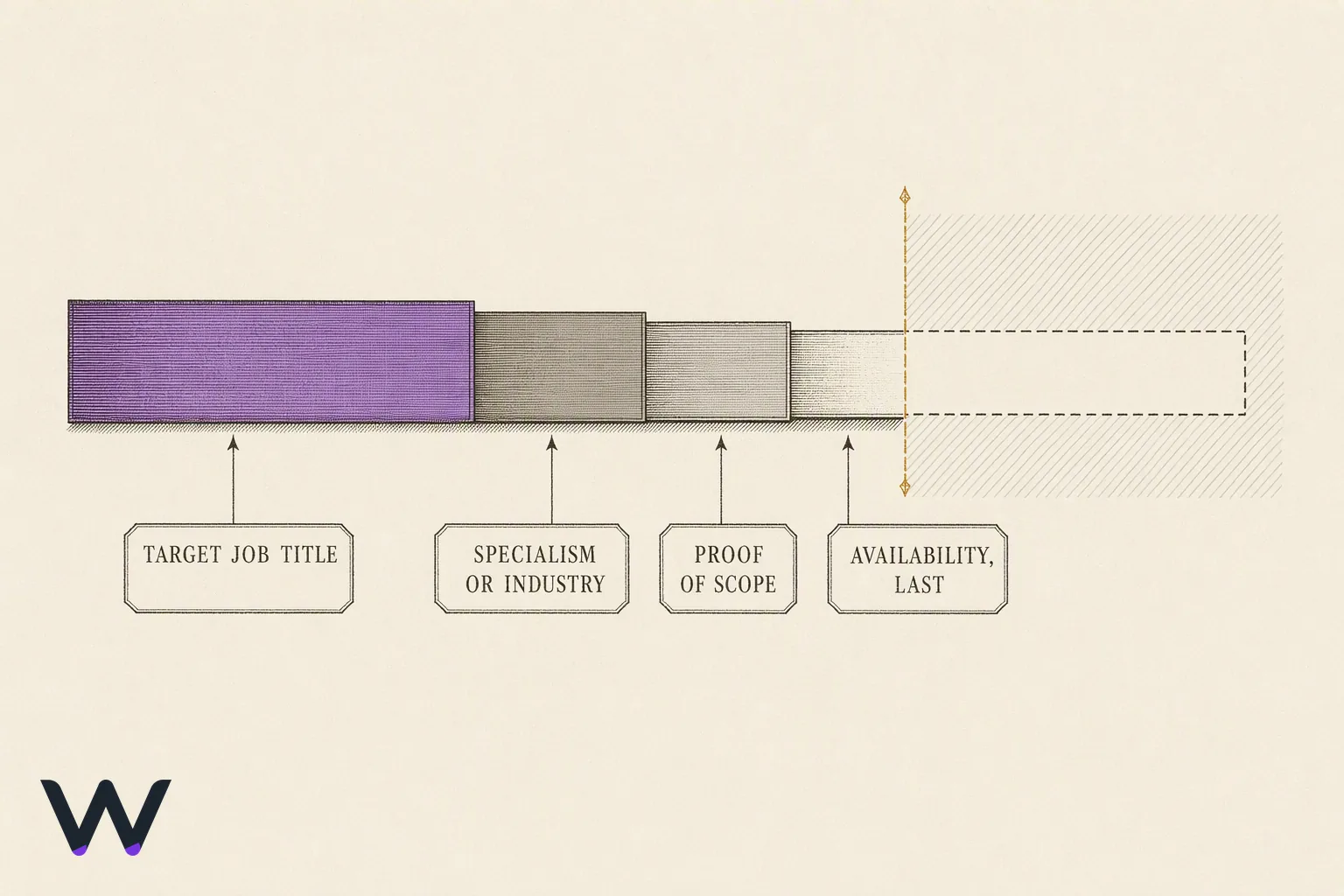
A good eye-catching headline is not clever. It is a job title a recruiter is searching for, followed by a number that proves scope. At 5-15 years in, your title is no longer the differentiator — thousands of people share "Senior Product Manager." The proof clause is what separates you, and it belongs second, right after the title, because LinkedIn truncates the tail on mobile and in search previews.
Seven mid-career headlines with the proof clause in position two. Treat the specifics as slots to fill from your own record, not as figures to borrow:
- Senior Product Manager | Rebuilt B2B SaaS Onboarding Across 3 Products | Fintech
- Director of Demand Generation | Eight-Figure Pipeline Sourced in 2025 | HubSpot, Salesforce
- Engineering Manager | Leading 14 Engineers Across 3 Squads | Distributed Systems, Go
- Supply Chain Manager | Cut Freight Spend Across 60 SKUs | SAP, Blue Yonder
- Head of Customer Success | Net Revenue Retention Above Target | Enterprise SaaS, 200+ Accounts
- Senior Financial Analyst | Built the FP&A Model Behind a $30M Budget | CPA
- Content Marketing Lead | 300 to 1.1M Organic Sessions in 24 Months | SEO, Editorial
Two shapes work as proof: a result with a delta, or a scope figure with a unit. "Improved retention" is neither. "Cut invoice processing from nine days to three" is a result; "Managing a 200-account book" is scope. If you cannot name the number, name the surface — the team size, the budget, the account count, the region.
Whichever number you pick, it has to be one you would defend in an interview from a document you can still open: a dashboard, a closed quarter, a board deck. A figure you cannot source when someone asks costs more in the room than the vaguer version would have cost in the search results.
How long the proof clause can run
Plan for roughly 60 characters before the title, and treat everything past that as the part that may not display. Search previews and mobile cut the tail; the profile page shows the full field. So the order is fixed: searchable title, then proof, then skills or industry last, since those are the pieces you can afford to lose.
Test it by searching your own name in a logged-out browser window on your phone. Whatever is visible there is your real headline. Everything after the cutoff is a bonus that only people already reading your profile will see.
Examples 22-28: unemployed and actively applying, including Open to Work headlines
Unemployment is not the thing to lead with, and the market explains why. Indeed's Hiring Lab, which tracks postings and searches on its own platform, put the ratio of job openings to unemployed workers at 0.9 in December 2025, the lowest level outside the pandemic since mid-2017 [2]. More competition per opening means the headline has to earn the click on capability, not sympathy. The same source has job searches on Indeed running as much as 31% above the early-December 2025 average in January 2026 [2] — the supply side moving too. State the role first. Put availability at the end, where it reads as information rather than a plea.
Seven headlines for an active search:
- Operations Manager | Process Automation, Vendor Management | Open to New Roles
- Registered Nurse, BSN | ICU and Step-Down | Available Immediately, Relocating to Austin
- Backend Engineer | Java, Kubernetes, AWS | Actively Interviewing
- Executive Assistant | Supporting C-Suite in Series B Startups | Open to Work
- Account Executive | SMB and Mid-Market SaaS | 6 Years Quota-Carrying | Open to Opportunities
- Mechanical Design Engineer | SolidWorks, GD&T, Injection Molding | Open to Contract or Full-Time
- Paralegal | Corporate and Real Estate | Notary | Seeking Full-Time in Chicago
The green banner is not the same thing
The "#OpenToWork" green photo frame and the headline text are two different settings, and a third one matters more than both. Open "Open to work" preferences on your own profile and the choice is in front of you: show the banner to all members, or share your status with recruiters only. The recruiter-only option is the one tied to the recruiter-side filter. The green frame is a public signal to everyone including your current employer, and it changes nothing about how you surface in recruiter search.
So turn the recruiter-only setting on regardless. Use the green banner only if your network is the channel you expect to work — freelancers and people in tight local industries usually should; anyone still employed should not. And keep the phrase in your headline short. Four words at the end, never four words at the front.
What changes when you are applying to 40 roles instead of one
Broad applications break headlines in a predictable way: the writer tries to cover every target and lands on "Results-Driven Professional," which ranks for nothing. The fix is not one vague headline. It is one headline per title cluster, and a clear rule about which titles can share a cluster.
Titles belong in the same headline when they share a keyword stem a recruiter would type. "Content Marketing Manager" and "Content Strategist" share "content"; a single headline reading "Content Marketing Manager | Content Strategy, SEO, Editorial Ops" surfaces for both. "Product Marketing Manager" and "Product Manager" do not. They share a word and almost nothing else — different hiring managers, different interview loops, different resumes. Chasing both from one profile produces a headline that convinces neither.
Run the test in three steps:
- Write down the exact titles from your last ten applications, verbatim from the job posts.
- Group them by the noun that carries the search, not by how similar the work feels to you.
- Count the groups. One group means one headline. Two or three means you pick the group you are strongest in and write for it.
The character budget decides the rest. You have roughly 220 characters, and the visible part is much shorter, so a headline covering three unrelated titles spends its display space on title-stacking and has nothing left for skills or proof. Two titles, one stem, two or three tools. That is what fits.
For the second cluster, do not rewrite the profile weekly. Put the secondary target in your About section and in the Skills list, where recruiter search also reads, and let the headline stay committed to the primary. LinkedIn's search rewards a profile where the headline, the current job title, and the top skills all agree; a headline hedging across clusters undercuts that agreement everywhere.
Pick your strongest cluster today and rewrite the headline for it alone. If applications in the second cluster start converting better over the next month, switch — one field, one edit, and the search index catches up within days.
What to avoid in your LinkedIn headline: 9 constructions that cost you searches
Avoid nine things in your LinkedIn headline. Five of them break search: a recruiter typing your target title will not find you. Four are only filler, which costs less but still burns characters you need.
- "Job Title at Company", left as LinkedIn wrote it. The default carries no skill a recruiter would ever type into a search box.
- "Aspiring" in front of the role. Recruiters search "Product Manager". Nobody searches "Aspiring Product Manager".
- Emoji as separators. Rockets and sparkles index as nothing. Use a pipe or a middot between phrases.
- Employer-internal titles. "L3 Delivery Partner" is a job title exactly one company searches for.
- A motto where the role should be. "Turning coffee into clean data" is charming and returns zero matches.
- Adjective stacks. "Results-Driven, Detail-Oriented, Passionate Professional" names no job, no tool, no industry.
- "Seeking new opportunities" in the opening phrase. True, unsearchable, and sitting in the slot your target title needs.
- Hashtags. A tag in the headline points at a feed, not at you.
- "Open to Work" typed as text. The green photo frame already says it, and it feeds the recruiter filter properly.
The split matters when you edit. The first five change whether you appear in results at all, so they get fixed today. The last four change whether a human keeps reading after they find you, so they get fixed on the next pass.
One practical test for word choice: paste your headline into LinkedIn's own search bar. If the top results are not people doing the job you want, the words are wrong, not the market. Then rewrite around the noun a hiring manager would use, and put it in the first six words.
Test the headline, then update it on a schedule
Change one element, wait a week, then read the counter. That loop is not folk advice — SHRM's own LinkedIn optimization guide tells job seekers to make a keyword change to the profile and then check the following week's LinkedIn search-appearances email to see whether it landed [3]. It works because two numbers on your own dashboard move independently.
Run it like this:
- Day 1. Rewrite one thing only: the title noun, the specialty, or the tools. Note the old version in a text file.
- Day 1. Screenshot your current "Search appearances" and "Profile views" counts so you have a baseline to compare against.
- Day 8. Open Search appearances and read the keywords LinkedIn says people searched. Wrong keywords mean the headline is describing a job you are not applying to.
- Day 14. Compare both counters against the baseline, holding your application volume roughly steady.
Search appearances is the headline's metric. Profile views is the metric for everything else you did that fortnight, so do not credit the headline for a spike that followed a comment on a hiring post.
Two caveats on reading the result, because this is your own data and nobody is controlling it for you. The counts are small, so week-to-week noise is real; a single-digit move is not a signal. And the searched-keyword list is the more trustworthy of the two readouts, because it tells you what the index matched you on rather than how many people happened to be searching that week.
Call it a failure when search appearances are flat or down after two full weeks and the searched-keyword list still does not contain your target title. Revert to the saved version, change a different element, and run it again. Two variables at once tells you nothing.
Update frequency splits by mode. In an active search, retest every two weeks until the keyword list matches your target titles, then leave it alone. Passively open, twice a year is enough, plus any time your title, your tooling, or your target industry changes.
Set a calendar reminder for the Monday after your next rewrite. The email arrives weekly whether you read it or not.
Where the headline stops and the LinkedIn summary starts
The headline holds the claim. The About section holds the evidence for it. If a sentence needs a second sentence to make sense, it belongs below, not in the 220 characters at the top of your profile.
Three things earn a place in the headline: the title you are applying for, the specialty or industry that narrows it, and the two or three tools or skills a recruiter would filter on. Everything else is summary material. Career changes, employment gaps, portfolio links, the reason you left healthcare for fintech, what you want next: all of that reads as noise in a search result and as context in the About section.
A short LinkedIn summary that does not repeat the headline has four parts:
- Opening line. Name the role and one piece of proof. Not the headline reworded.
- Three LinkedIn bullet points. One result each, with the tool named and a timeframe attached. Bullets scan; the LinkedIn description field renders them fine as plain characters.
- A context line for anything the headline could not carry: the pivot, the gap, the visa status, the relocation.
- Closing line. State what you are looking for and give a direct contact route, such as an email address; "feel free to connect" names no channel.
The test for overlap is mechanical. Read the headline, then read the first line of the summary. If the second one tells a recruiter nothing the first did not, delete it and start the summary at the proof instead.
Write the headline first, then the About section against it. Doing it the other way produces a summary you like and a headline nobody finds.
Frequently asked questions
What is a good profile headline?
A good profile headline names the job title you want, one specialization, and one proof point, in that order. "Staff Accountant | Month-End Close, NetSuite | CPA (2025)" works because a recruiter searching "staff accountant NetSuite" hits all three terms. Skip taglines about passion, journeys, or being a lifelong learner. They match nothing.
What's a good eye-catching headline?
Eye-catching in a LinkedIn search result means specific, not clever. A number does the work: "Ops Analyst | Cut invoice processing from 9 days to 3" stops a scroll where "Detail-oriented professional" does not. Recruiters skim a column of near-identical titles, so the differentiator has to sit in the first 40 characters.
What are headline examples?
LinkedIn headline examples are the 220-character lines that sit under a name on a profile. Three shapes cover most of them: title-plus-skills ("Frontend Developer | React, TypeScript, Accessibility"), title-plus-result ("SDR | Quota Exceeded Every Quarter, FY25"), and seeking-plus-evidence ("Marketing Graduate Seeking Analyst Roles | Google Analytics Certified"). Pick one shape and fill it.
What should I avoid in my LinkedIn headline?
Avoid four things: the word "Unemployed", emoji strings, buzzword stacks like "results-driven visionary", and the bare word "Seeking" with no target title attached. Also avoid leaving the default, which is your last job title and company. That default tells a recruiter where you were, never what you are applying for now.
Is a LinkedIn headline generator worth using?
A LinkedIn headline generator earns its keep at one job: producing eight variants of a formula you already picked, so you can pick the phrasing that reads cleanest. It cannot tell you which job titles recruiters in your market actually type into search. Get that from live job postings, then feed the generator the terms.
Does my headline show up on a LinkedIn blog post or article?
Yes. Your profile headline appears under your name on every LinkedIn blog post, article, comment, and connection request, which is why the first 40 or so characters carry the weight. In a comment feed, that truncated fragment is the entire pitch. Front-load the target title; push certifications and metrics to the back.
Rewrite your headline this week, then open next week's LinkedIn search-appearances email and check whether the keyword change moved you [3].
References
- The Skills-First Movement: Redefining How Organizations Hire and Grow — shrm.org
- February 2026 US Labor Market Update: New Year, Same Resolutions — indeed.com
- How to Write an SEO-Enhanced LinkedIn Profile — shrm.org

Stop applying. Start interviewing.
- ✓Wobo finds matching roles and applies for you
- ✓Tailored resume, cover letter and answers included
- ✓You focus on interviews, we handle applications