Last updated: 2026-08-24
Certifications on a resume come down to one repeatable entry format and one placement decision: four fields in a fixed order — the credential's name, who issued it, the date, and the ID — placed according to whether the posting calls the credential required, preferred, or nice to have. Building the master list takes one sitting. After that, the keep/cut pass runs under a minute per application, which is the point when you are firing off twenty of them a week. Licensed practitioners are the exception to almost everything below, and the five-entry cap is the first rule they should ignore.
- Gather the raw material: names, issuers, dates, IDs, expiry months.
- Pick the placement from four options, ranked by how the posting treats the credential.
- Cut every certification that fails the four tests against that specific posting.
- Write each entry in the same four-field order, one line where it fits.
- Order the entries reverse-chronologically, or relevance-first when you have a reason.
- Add post-nominal letters after your name only for licenses and industry-standard credentials.
- Label in-progress, expired, and lapsed credentials inside the entry itself.
- Copy the posting's credential wording character for character — "Project Management Professional (PMP)", never "PMP certified".
What you need before you start
Assemble the raw material in one scratch file before you open the resume document. Every item below is something you either have in front of you or do not, and each missing one stalls a different part of the build. Where a rule below carries a number or a deadline, it is drawn from the issuing body's own published policy, a state's administrative code, or a university career office — not from a third-party summary of one, and the section named is stated so you can check it yourself.
- The certification name in the issuer's own spelling. "Basic Life Support" and "BLS Certification" are not interchangeable strings to a keyword matcher, and guessing the wording is how a match gets missed.
- The issuing organization's full legal name. Project Management Institute, not PMI on its own. A recruiter verifying the credential searches the issuer first, and an abbreviation-only line gives them nothing to search.
- Issue date, and expiration date where one exists. Dates decide whether an entry goes in the current section or the expired handling later on. Look them up rather than estimating: under SHRM's own recertification policy, a certification's three-year cycle begins the day the exam is passed and ends on the last day of the holder's birth month three years later [1].
- Credential ID or license number. Digital badges from Credly and most state licensing boards carry one. Without it, a verifiable credential reads as an unverifiable claim.
- The target job posting, saved as plain text. You need the posting's own credential wording side by side with yours. Working from memory produces near-misses.
- A resume file format the parser reads. A .docx file, or a PDF exported from text rather than scanned or flattened to an image. Certifications inside a text box, a header, or a two-column table often never make it out of the file.
Missing a credential ID is survivable. Missing the posting is not — the placement decision below runs entirely off its wording.
✨ Build a Resume That Gets Interviews
AI analyzes 24 ATS criteria · Tailors your resume to each job · Free forever
Build My Resume Free →★ 4.7/5 on Reviews.io
Where to put certifications on resume: four placements, ranked
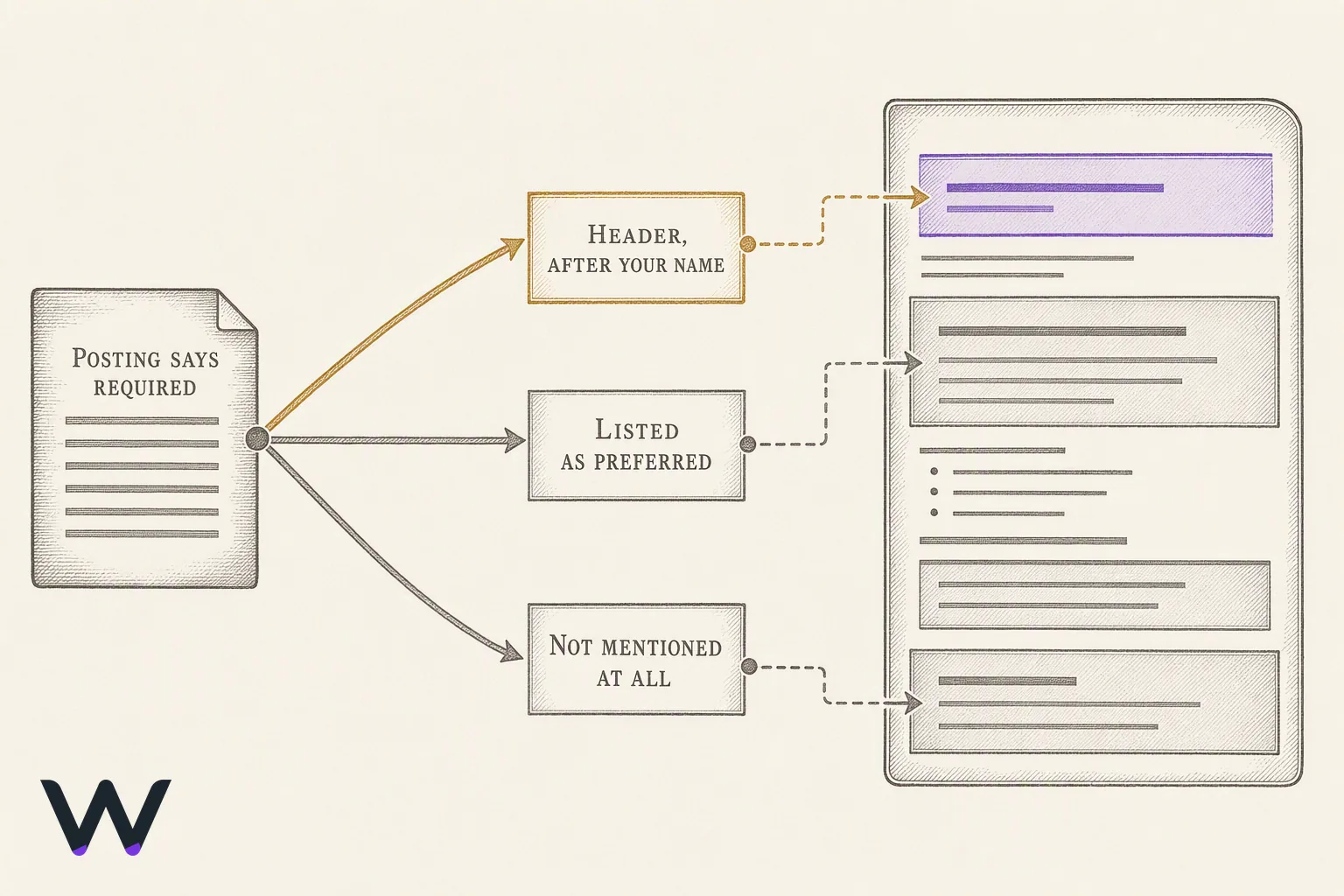
Four placements exist, and the posting decides which one you use. The rule is the credential's status in that posting: required, preferred, or nice to have. Required credentials go where a human sees them before they scroll — the header line under your name, or the top-of-page summary. Preferred credentials get a dedicated Certifications section above Experience. Nice-to-have credentials sit at the bottom, under or beside Education, and they stay there.
Should certifications go at the top or bottom of a resume? Top when the posting lists the credential as required, bottom when it does not mention it at all. There is no aesthetic tiebreaker. A Registered Nurse applying to a role that names "current RN license" as a screening requirement puts it after their name; a marketing manager with a HubSpot certificate puts it near Education and moves on.
| Placement | Use when the posting | Where it sits | What it costs you if wrong |
|---|---|---|---|
| Header, after your name | Names the credential as required | Same line as your name: "Dana Ortiz, RN, BSN" | Nothing, if the credential is genuinely required |
| Dedicated Certifications section | Lists it under preferred qualifications | Above Experience, below the summary | Pushes work history down a screen |
| Inside Education | Never mentions it, or it is academic-adjacent | Below degrees, own sub-block | Buried, but honestly ranked |
| Inside the summary | Requires it and screens on it | Sentence one of a three-line summary | Duplicated wording if it also appears below |
The section header string matters more than the layout
Parsers work by segmenting your file into blocks and pulling structured fields out of each one — iCIMS, describing its own parsing product, says the technology extracts candidate data such as contact details, language proficiency, and years of experience straight from the uploaded document [2]. Segmentation happens on your header text. So use a header the software has seen a hundred thousand times: "Certifications", "Licenses and Certifications", or "Certifications and Licenses". All three are safe.
Creative headers are where this quietly breaks. "Credentials and Continuing Ed", "Professional Development", and "Ongoing Training" are not standard block names, and a parser that fails to recognize the block folds those lines into whatever section came before — usually Education, sometimes Skills. The content survives. The structure does not.
Combining certifications with education
Combine only when you have one or two credentials and neither is required by the posting. A single "Certifications" sub-block under Education is cleaner than a three-line standalone section floating above Experience. Split them the moment a posting names a credential in its requirements, because a combined block puts your license behind your degree in reading order, and the person screening for the license is not reading for the degree.
One arguable position: the header-line placement is underused by candidates who have earned it. If a state board issued you a license and the posting will not consider you without it, putting it in a section on page two is a formatting decision costing you screens. Put it after your name. One comma, four letters.
Step 1: Cut the list to the certifications that earn a spot
Cut every certification that does not pass four tests against the specific posting in front of you. Applying at volume makes this feel like wasted effort — it is the opposite. The keep/cut pass takes under a minute per posting once the master list exists, and it is the only step that changes what a keyword matcher sees.
Run each credential through these, in order:
- Required by this posting. The posting names it in requirements or minimum qualifications. Automatic keep, and it moves to the top placement.
- Keyword match on the posting's own string. The posting says "PMP" and your entry says "PMP", not "project management credential". Matching happens on the literal string, so mirror the posting's spelling and give the abbreviation and the full name both.
- Issuer a reader recognizes. CompTIA, the American Heart Association, Google Career Certificates, a state licensing board. An unknown issuer is not disqualifying, but it earns a spot only when the credential is otherwise directly relevant.
- Still current. Check the expiration before you list it. SHRM's published recertification policy requires 60 professional development credits inside each three-year cycle, and gives a holder who misses the deadline a 60-day grace period before the certification is revoked [1].
What certifications should go on a resume? The ones the posting asks for, the ones from issuers in your industry, and the ones that are current. Everything else is filler. A completed Coursera course in a subject nobody in the hiring chain cares about does not become relevant by sitting on the page.
Are certificates worth the space? Relevant ones do real work; irrelevant ones actively cost you. A long list of unrelated certificates reads as unfocused, and worse, it dilutes the two entries that actually match the posting by burying them among six that do not. Signal per line is what you are managing here.
How many entries before the section dilutes itself
Keep the section short enough that someone scanning it reads every line. If your certifications list is longer than your education section and none of the extra entries appear in the posting, you have a master list on the page instead of a resume section. Trim to what matches.
Keep the full list somewhere else. A master document with every credential, issuer, date, and ID means each new application is a copy-paste selection rather than a fresh archaeology dig through old emails. That is the part that scales when you are sending twenty applications a week.
One judgement call worth stating plainly: an in-progress certification from a recognized issuer beats a completed one from an issuer nobody knows, when the in-progress credential is the one the posting names. Recruiters hire against the requirement. A candidate three months from a PMP is closer to that requirement than a candidate holding an unrelated certificate they finished last year.
Step 2: How to add certifications to resume entries — name, issuer, date, credential ID
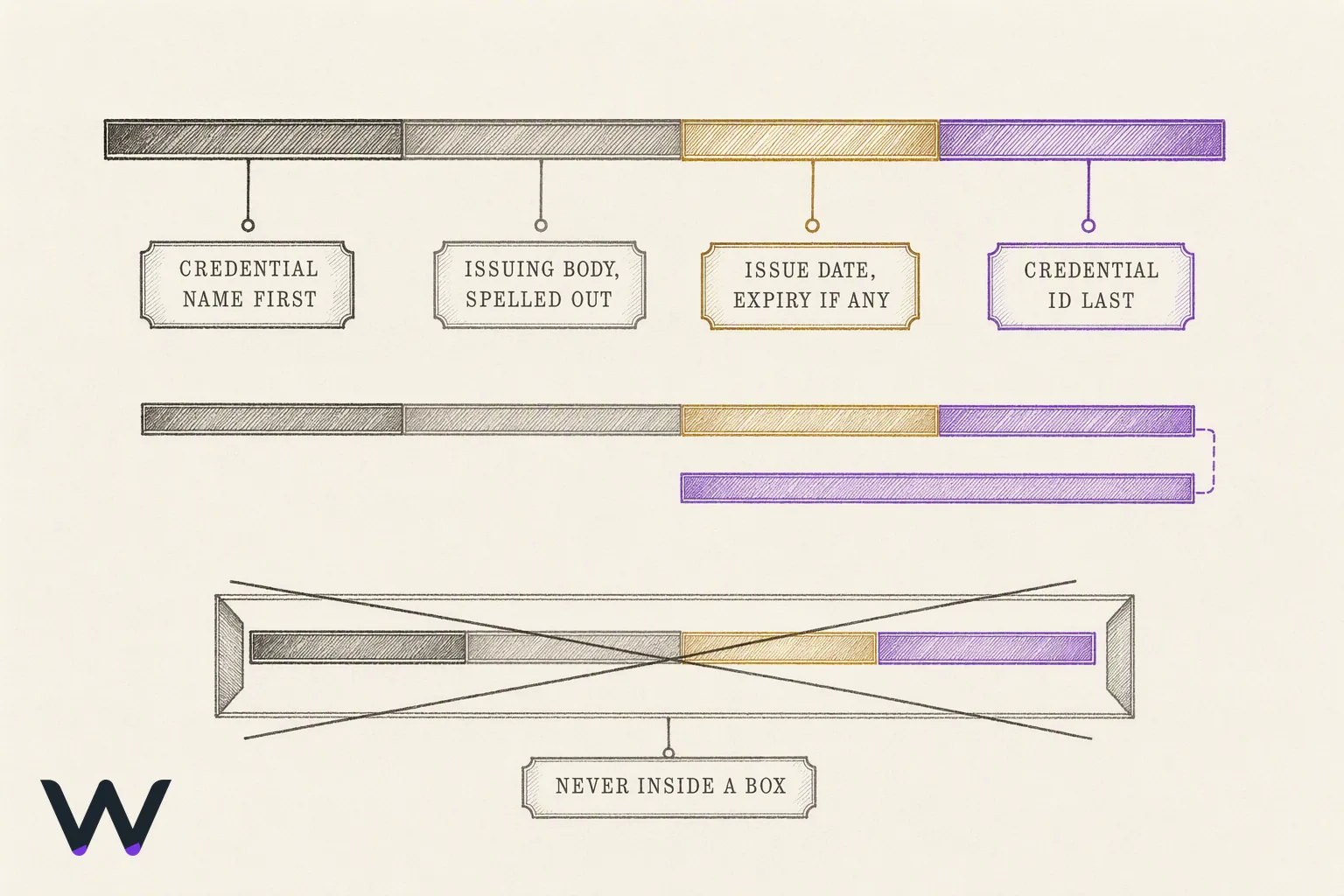
Write every entry in the same four-field order: the credential's name, then the issuer, then the date, then the ID. One line where it fits, two when the ID runs long. Consistency across entries is what makes the block readable at a glance and parseable as a set — a section where each line uses a different field order reads as three separate facts instead of one structured list.
The order, and what each field does:
- The credential's name first. This is the field a recruiter scans for and the string a keyword matcher compares against the posting. Nothing goes in front of it — not the date, not the issuer.
- The issuing body second. Full name, not the acronym alone. "Project Management Institute" tells a reader who stands behind the credential; "PMI" assumes they already know.
- The date third. Issue date always. Expiration date too, when the credential expires. Format the dates identically across every entry and across the rest of the resume.
- The ID last. Include it when the issuer provides one and the credential is verifiable, which covers digital badges from Credly and anything issued by a state licensing board.
A finished entry looks like this:
Professional in Human Resources (PHR), HR Certification Institute, issued 2025, expires 2028. Credential ID on request.
Spell out the full name alongside the abbreviation
Write both, once, in the same line: "Society for Human Resource Management Senior Certified Professional (SHRM-SCP)". A posting may use either form, and a keyword matcher comparing the posting's string to yours only sees what you typed. Writing the acronym alone bets that the posting also abbreviates. Writing the long form alone bets the opposite. Writing both wins either way, and costs you three words.
The exception is a credential where the abbreviation is the common name and the expansion is nearly unknown — the abbreviation goes first there, with the expansion following in parentheses. Follow the issuer's own house style. They print it the way the industry says it.
When the credential ID belongs on the page
Include the ID for licenses, for regulated professions, and for any credential where the employer is required to verify before your start date. A nursing license number and a state licensing board's issuing state belong on the resume, because the verification happens whether or not you make it easy.
Leave the ID off when the credential is a course completion certificate with no meaningful verification path. A long alphanumeric string next to an online course badge adds a line of clutter and verifies nothing anyone will check. "Credential ID available on request" is a reasonable middle setting for a section that is already running long.
One formatting rule that overrides preference: never put the certifications block inside a text box, a table cell, or a two-column layout. Whatever field order you chose stops mattering when the block never gets extracted from the file. Plain lines, standard header, left aligned. Boring parses.
Step 3: Order the entries — reverse-chronological or relevance-first
Two orders exist; only one fits any given file. Reverse-chronological — newest credential first — is the default, and it is the default because it matches what a recruiter's eye already expects from every other block on the page. Relevance-first, where the credential the posting names sits at the top regardless of date, is the exception you earn by having a specific reason.
Use reverse-chronological when your newest certification is also your most relevant one. That covers most people still working in the field they trained for.
Use relevance-first in three situations. A career changer whose newest credential is the old career's renewal and whose target credential is three years old: lead with the target credential, because the recruiter scanning for it should not have to read to line four. An entry-level applicant with one credential that matches the posting and three that do not: the matching one goes first, and the rest can go in a single comma-separated line under it. A renewals-heavy field — nursing, IT security, safety training — where reverse-chronological order buries a decade-old license under this year's four-hour recertification. The license is the credential doing the work. Put it first.
Breaking ties inside the same year
Two credentials from the same year need a rule, or the order looks arbitrary and the reader notices. Rank by three tests in order:
- Match to the posting's own wording. The credential whose name appears in the job description goes above the one that does not.
- Barrier to entry. A proctored exam with a prerequisite outranks a self-paced course completion, every time.
- Issuer recognition. A credential from a body the hiring manager can name outranks one from a platform they cannot.
Do not add months to your dates just to break the tie. Month-level precision on certifications invites a question you gain nothing by answering, and it makes a January credential look older than it is by December.
One argument against relevance-first is worth taking seriously: a recruiter who assumes reverse-chronological will read your top entry as your newest and misjudge your recency. That risk is real and it is small, because the date sits right there in field three of every entry. If you are unsure, the tiebreaker is application volume. Firing off 20 applications a week, you cannot reorder the section per posting, so pick relevance-first against the role you are actually targeting and leave it fixed. Applying to five carefully chosen roles, reorder for each one — it takes ninety seconds and it is the highest-value ninety seconds in the whole document.
Step 4: Post-nominal letters after your name, and the summary line
Post-nominal letters are the abbreviations that follow your name on the header line: PMP, CPA, RN, SHRM-SCP, CISSP. Only two categories belong there. A license required to practice your profession, and a certification your industry treats as a standard credential rather than a bonus. Everything else stays in the certifications section.
Format the header line as name, comma, then credentials separated by commas: Dana Whitfield, RN, BSN. No periods inside the acronym — write CPA, not C.P.A. Order them by seniority, not alphabetically: the license first, then the certification, then the degree if you include one at all. Two credentials is the working ceiling. Three reads like a signature block, and past that the line stops looking like a name and starts looking like a claim.
Never let the abbreviation stand alone. A candidate who puts SHRM-SCP after their name and nothing else has given the recruiter an acronym and left the parsing to them; SHRM's own resume-writing guidance says to spell such a post-nominal out into its full name under a dedicated credentials section rather than leaving only the abbreviation behind the candidate's name [5]. That matters twice over for anyone applying at volume. A parser matching a posting's credential string finds whichever form the posting used, and a human skimming finds the one they recognize.
The summary line
Your professional summary gets the credential once, in a sentence that does other work at the same time. Not "PMP-certified professional with strong leadership skills." Write what the credential is attached to: "PMP-certified program manager, six years running vendor-side infrastructure builds." The credential establishes credibility by sitting next to the thing it qualifies you to do, not by appearing on its own.
Say it once. The credential now appears in three places — after your name, inside the summary, and as a full entry in the certifications section — and a fourth mention in the skills list is the point where a reader starts counting mentions instead of reading. Cut it there.
One more rule for the header. If the credential is expired, in progress, or under renewal, it does not go behind your name under any circumstance. The header line is the one place on a resume that reads as a flat assertion of current standing, with no room for a qualifier.
Step 5: Label in-progress, expired, and lapsed credentials honestly
Label the status in the entry itself, in the same four-field line, never in a footnote and never by omission. A credential with no status label reads as active, so leaving one off an in-progress certification is a claim you did not mean to make — and it is the kind that surfaces in a background check rather than an interview.
Use this exact wording by case:
- In progress, exam scheduled:
CISSP (in progress — exam scheduled March 2027), ISC2. Name the date only if you have one booked. - In progress, coursework only:
Google Data Analytics Certificate (in progress), Coursera. No projected completion date you cannot defend. - Expired, still relevant:
CompTIA Security+ (expired 2025), CompTIA. Keep the issue date visible so the reader sees the training happened. - In renewal grace period:
CISSP (renewal in progress), ISC2. This is the honest label when you are inside the window and completing credits. - Provisional or preliminary license:
Preliminary Teaching Credential, California CTC. Use the issuing body's own term for the tier, never a shortened version that reads as the full license. - Failed or abandoned: cut it. There is no honest way to list a credential you did not finish and are not pursuing.
The grace period case deserves its own note, because it is the one most people get wrong in both directions, and the answer sits in the issuer's own rulebook rather than in hiring folklore. ISC2's published member policies give a certified member 90 days after the expiration date to finish outstanding CPE credits before the credential is suspended [3]. Inside that window the credential is not expired — it is in renewal, and labeling it "expired" undersells a credential you still hold. The same policy document keeps a suspended certification in suspension for up to two consecutive years before the holder is terminated and membership rights revoked [3]. Suspended is not terminated. But suspended is also not something to list without the label.
State-issued licenses run on their own clocks, written into administrative code rather than issuer policy, and the reinstatement rule is what matters to you. Ohio's licensing rule for the credential at issue there allows a lapsed license to be reinstated without retaking the exam if the holder applies for renewal within one year of the lapse date [4]. Check your own board's window before you decide whether an entry is worth keeping, because a license you can reinstate with paperwork is a different asset than one that requires re-examination.
When to take it off entirely
Two years past expiry with no renewal in progress is the line. Past that, the entry is describing a person you used to be, and the space buys more as a skills bullet. Two exceptions hold: a license in a field you are actively returning to, and a foundational credential — an expired CCNA on a network engineer's resume still tells the reader where the fundamentals came from. Everything else comes off.
Step 6: Match the posting's own credential wording, the way the ATS does
Copy the credential out of the posting character for character, then paste it into your entry before you upload anything. A requisition that spells out "Project Management Professional (PMP)" and a file reading "PMP certified" are not the same string, and several of the products standing between you and a recruiter compare strings rather than meanings.
After the edit, your entry should read word for word like the line in the requirements block, with the acronym in parentheses immediately behind the spelled-out name. Both forms, one line. That covers the two different ways an application gets checked.
Applicant tracking systems screen in two different mechanisms, and the split decides how much your wording matters:
- Form-field gates. Some portals ask knockout questions on the application form itself — do you hold the credential, is it current, what is the license number. You answer those in form fields. The wording inside your file is not what the gate reads; your answers are.
- Search against parsed text. Elsewhere no gate fires at all, and a recruiter runs a keyword or boolean search across the text a parser pulled out of uploaded applications. Parsing is the step that produces that text — the same extraction of contact details, language proficiency, and years of experience off the document that iCIMS describes in its own explainer [2] — so a credential line only becomes searchable if it survives into that output legibly.
A recruiter searching "CompTIA Security+" will not surface a file whose certifications section says "Security Plus", and no amount of formatting discipline rescues that, because the mismatch is vocabulary rather than layout.
So build a master resume that holds every credential you have in both spellings, with the issuing organization written out in full: American Heart Association, not AHA alone. Then per application, cut the credentials the posting does not care about and re-spell the ones it does, in its exact wording. That is the whole edit. It costs less time than rewriting a summary paragraph nobody reads, and it is the single per-application change with a mechanical effect on whether your file gets returned by a search.
Credential keywords are worth mirroring; job-description verbs are not. Stuffing "detail-oriented" and "cross-functional collaboration" into a certifications section is the ats optimization advice that wastes the most time for the least return, because those phrases are not what a credential search queries. Recruiters search the credential and the issuer.
Where this goes wrong: a posting names a credential you hold under a different brand name, usually because the issuer renamed it. Write the posting's version first and yours in parentheses behind it, rather than picking one and hoping. Two strings cost you nine characters and match both searches.
How to check it worked
Save the file, then re-open it in a plain-text editor before you send it anywhere. Copy the whole document, paste it into a blank .txt file, and read what lands. The plain text export is roughly what a parser sees, so anything that scrambles here scrambles there.
Read the certifications block specifically and check for these:
- Section heading survives as its own line, reading "Certifications", not merged into the line above it.
- The credential's name, its issuer, and the date sit as three readable units, not one run-together string.
- Every entry appears. A missing credential in the text file means the layout swallowed it.
- Order holds. Credentials arriving out of sequence signal a column or text-box problem.
- Acronyms survive intact, parentheses included, rather than dropping their brackets.
This paste-into-plain-text pass is the check MIT's Career Advising and Professional Development office publishes for applicants, on the reasoning that missing text or text arriving out of order is the same conversion fault an applicant tracking system will hit [6]. Their phrasing for what you are looking for: "Missing text: this might indicate a conversion issue with your document related to formatting." [6]
Run the second check inside the application itself. Many application portals show you a parsed profile before you hit submit, with fields already populated from your file. Open it. If the certifications came through as skills, as employment history, or not at all, you have found the failure before the recruiter did, and you can fix the file and re-upload in the same session.
The LinkedIn import is the cheap third pass: import the file into a LinkedIn profile draft and see which credentials populate the Licenses & Certifications section on their own. Fields that stay empty are fields your document did not label clearly enough for a machine to route. Fix the label, not the design.
When it does not work
Four failures account for nearly every certifications section that disappears between upload and recruiter. Each has a visible symptom in the plain-text export, and each has one fix.
| Symptom | Cause | Fix |
|---|---|---|
| Credentials absent from the parsed profile entirely | Section sits in a sidebar, text box, or two-column layout | Rebuild as single-column body text with a top-level heading |
| Certifications merged into your job history | Entry formatted like a role, with the issuer in the employer position | Put credential name first, issuer second, date last, on one line |
| Dates read as employment dates | Date written as a range with an end date | Write the issue date alone; add expiry only where the credential carries one |
| Recruiter search misses you | File spells the credential differently from the posting | Write the full name and the acronym in parentheses on the same line |
| Section header ignored by the parser | Heading reads "Credentials & Training" or "Professional Development" | Retitle it "Certifications" and nothing else |
The section header matters more than most resume advice admits. Parsers route content by recognizing a small set of expected headings, and a creative label sends a perfectly formatted entry into the wrong bucket or into no bucket at all. Boring wins here. "Certifications" is the string that works, and a clever heading costs you the whole block.
Acronym mismatch is the failure that leaves no trace. Nothing is missing from the plain-text export, the parsed profile looks correct, and your application still never surfaces, because the recruiter searched the credential's full spelled-out name against a file that only says CISSP. You cannot detect this by reading your own document. You detect it by comparing your line against the posting's line, which is why that comparison belongs in the routine rather than in a final proofread.
One fix people reach for that is not worth the effort: keyword-stuffing the section with credentials you do not hold, or with "in progress" labels attached to courses you started and abandoned. In licensed fields the check is a public one — Nursys, run by the National Council of State Boards of Nursing, confirms RN, LPN/VN, and APRN status and discipline records across the jurisdictions in the Nurse Licensure Compact [8] — and an unverifiable line does more damage than an empty section. The certifications block earns trust because it is checkable. Keep it checkable.
If the plain-text export looks clean and the parsed profile still drops the section, the cause is almost always the file format rather than the layout. Export a fresh PDF from the source document rather than printing to PDF, or submit a .docx where the application accepts one. Then re-run the plain-text check on the new file before you resubmit.
How many to list, and how far back an old certification still counts
Cap the section at five entries. Past five, a recruiter skims, and the two credentials the posting actually named sink under the ones you collected on a slow weekend. The exception is a licensed role: if you hold a stack of active licenses and endorsements, the block stops being a highlight reel and becomes a compliance list, so list every live one and drop everything else.
Recency is a field question, not a resume question. A project-management credential earned a decade ago and renewed on schedule reads as strong as one earned last spring, because the renewal cycle is the signal, not the original exam date. An expired cloud badge of the same vintage reads as a museum piece: the exam has been rewritten and half the services it covered have new names. Same age. Opposite meaning.
| Credential type | How long it keeps value | What to do once it ages |
|---|---|---|
| Renewable professional (PMP, CPA) | As long as it stays current | List the current cycle only, no original date |
| Cloud and platform (Amazon Web Services, Microsoft Azure) | One exam version back | Drop it or move it to a "Coursework" line |
| Security (CISSP, CompTIA Security+) | Through the active term | Recertify before the term ends; a lapse is a gap |
| Clinical and safety (Basic Life Support, Advanced Cardiac Life Support) | Through the card date | Remove the instant it expires |
| Vendor tool badges (Google Analytics, HubSpot Academy) | Two years, roughly | Delete rather than date; nobody screens on a stale tool badge |
| Academic or one-time (Six Sigma Green Belt) | Indefinitely | Keep, with the year, no renewal claim |
When the issuing body has rewritten the exam since you sat it, the entry is not automatically dead. Name the version or track you passed and the year, in the entry itself, and let the hiring side judge the distance. Hiding the year on a credential that has visibly moved on is worse than showing it, because the interviewer finds out in the first technical question rather than on the page.
The rule worth applying to every borderline entry: if the credential is not renewable and the field it covers changed, it belongs on the page only when the posting names it. Everything else is filler competing with your own best entries for the same six seconds of attention.
Go through your current section now and mark each entry renewable, expired, or superseded. The expired ones come out today. The superseded ones get a version and a year, or they come out too.
Certifications from unknown issuers, bootcamps, and free online courses
A certification comes from an issuing body that assesses you against a standard it controls, and it carries an expiry or a renewal cycle. A certificate of completion records only that you finished a course. One measures you against a bar someone else set. The other confirms you showed up and reached the end.
Licensure is a third thing, and mixing it into the certifications block is a parsing error with real cost. An RN or CPA license is state-granted permission to practice, tied to a number and a jurisdiction, and a hiring system screening for it expects a state and a status. Filing that under "Certifications" alongside a weekend course tells the screener you do not know the difference. Recruiters in regulated fields notice that first.
Where bootcamp and free-platform credentials go
Bootcamps and free platform courses are training, so label them as training and the entry stops overclaiming. A data-analytics certificate from Google, a General Assembly immersive, a freeCodeCamp certification: each is coursework with a curriculum and no external exam board, and each reads honestly under a heading like "Professional Development" or as a line inside Education. Under "Certifications," the same entry reads as inflation, and the reader discounts the credentials sitting next to it.
Format them with the same four fields as everything else. Give the program's official name, the issuer, the completion year, and one line of what it covered if the program is not widely known. Skip the hours-completed figure. Nobody is buying seat time.
Which entries to cut
Drop any credential you cannot point a recruiter to. The test is verification: does the issuer maintain a public registry, a verification page, or a digital badge on a service like Credly that a stranger can check without emailing you? Professional bodies keep those. Content mills do not.
Three categories go, without much agonizing:
- Credentials from an issuer whose name returns nothing recognizable in a search
- Purchased or attendance-only certificates with no assessment behind them
- Anything from a platform where you completed a single short module
An unregulated field is where this judgement matters most. Nursing, accounting, and the trades have registries that settle the question for you. Marketing, design, and most of software do not, so the burden sits with you, and the safe move is to keep the entry only if you would happily discuss the assessment behind it in an interview.
Audit yours on the verification test this week. Anything that fails it is either coursework or clutter, and both of those have somewhere else to live.
✨ Build a Resume That Gets Interviews
AI analyzes 24 ATS criteria · Tailors your resume to each job · Free forever
Build My Resume Free →★ 4.7/5 on Reviews.io
The step most applicants skip, and the shortcut that costs interviews
Write the acronym and the spelled-out name in the same entry, every time: "Basic Life Support (BLS)", not "BLS" alone. Job postings are inconsistent about which form they use, and a file carrying only one of them matches only half the postings. SHRM's career guidance frames keywords, certification names included, as the factor that can make or break a candidate once the file is fed into an applicant tracking system or other scanning tools [7]. This is the step most applicants skip, and it costs nothing to fix. Ten seconds per entry.
The shortcut that costs interviews is the opposite instinct: dumping every course you have ever finished into the section on the theory that more keywords equal more matches. It does not work that way. A screener reading eight entries gives each one less weight, and the credential the role actually requires arrives fourth in a list where the first three are platform badges. Dilution is a real cost with no offsetting benefit.
There is a version of keyword-matching advice that says to mirror the posting's exact credential string. Do that only where it is true. Rewriting "CompTIA Security+" as whatever the posting called it, when you hold something adjacent, is the kind of near-miss that a recruiter catches in the phone screen and reads as dishonesty rather than optimization.
So: full name plus acronym on every entry, and only the entries you would defend out loud. Open your certifications block, expand each acronym, then delete the weakest entry. That last part is the one people flinch at, and it is the one that moves the section.
Frequently asked questions
What a hiring screen needs to see on a CPR certification
The full course name, the issuing body, and the expiry month and year: "BLS/CPR Certification — American Heart Association — expires March 2027". Screeners in healthcare hiring read the date before the name, because CPR cards run on a two-year cycle and a card without a date reads as a lapsed card. The Red Cross and the AHA issue different courses, so the entry should say which one the candidate holds.
How employers read an expired or renewing CPR card
An expired card carries weight only when the renewal class is already booked and both dates appear in the line: "BLS/CPR, American Heart Association — expired June 2026, renewal scheduled September 2026". Dropping the date to hide the lapse is the worse move, since a credential line with no date invites a screener to assume nothing else on the page is dated either.
What an employer needs on an RN license entry
Its own line under a "Licenses" heading placed above certifications, carrying the licensing state, the license number, compact status, and the expiry date: "Registered Nurse, Texas RN #123456, multistate compact privilege, expires October 2027". Licensure is legal permission to practice, not a nice-to-have, and it gets verified rather than skimmed — Nursys, run by the National Council of State Boards of Nursing, confirms RN, LPN/VN, and APRN status and discipline records across compact jurisdictions [8]. Assume any number printed will be looked up.
How employers handle candidates licensed in several states
One line per state, ordered so the state the job sits in comes first, with any multistate privilege marked on the line it belongs to: "Registered Nurse, Arizona RN #987654, multistate compact privilege, expires May 2027" then "Registered Nurse, California RN #654321, expires January 2028". Reorder the lines for each application. A compact privilege that already covers the posting's state is the strongest thing in that block, so it should not be sitting fourth.
Which certifications do employers actually screen for
The ones the posting names, the ones a state or licensing board requires to practice, and current ones in the field. Expired credentials with no renewal booked, single-hour completion badges, and anything a hiring manager would read as filler get cut. Spelling the credential out in full beats leaving a bare post-nominal behind a name. Six strong entries beat fifteen.
Do certificates carry weight with hiring managers
They help when they map to something the job asked for, and do nothing when they do not. A parsing tool pulls structured fields — contact details, language proficiency, years of experience — off the uploaded file [2], so a certificate mostly matters as a keyword the posting also contains. A Coursera completion certificate in an unrelated subject is page weight. A required credential is a filter the candidate passes.
References
- SHRM Recertification — shrm.org
- What is CV/Resume parsing? | ICIMS — icims.com
- Member Policies — isc2.org
- Ohio Admin. Code 4758-13-05 - Lapsed license or certificate and renewals — cornell.edu
- How to Write a Powerful and Memorable HR Resume — shrm.org
- Make your resume* ATS-friendly – Career Advising & Professional Development | MIT — mit.edu
- Leveraging Keywords to Advance Your Career — shrm.org
- License Verification (Nursys.com) | NCSBN — ncsbn.org

Build a Resume That Gets Interviews
- ✓AI scores your resume on 24 ATS criteria
- ✓Tailors it to each job with one click
- ✓Unlimited resumes — free forever