
Last updated: 2026-09-10
An applicant tracking system is the database an employer buys to store, parse and rank job applications. Your resume becomes a structured record inside it before any person reads a word. A February 2026 study of keyword-based automated screening measured algorithmic friction above 50% — more than half of qualified candidates are filtered out before a human ever reviews them [3]. That is a wording problem, not a talent problem. The recruiter judges the record; your document is only the raw material it was built from. Below: how the parse works, the five systems you will meet this month, what portal status labels actually mean, and the four tactics that cost applicants more than they return.
A note on where the claims here come from. Anything about how a parser behaves — what it drops, how it ranks — is sourced to published documentation of ATS behavior from a university career resource center and trade press covering the software, plus a February 2026 arXiv preprint measuring screening friction and iCIMS's own May 2026 workforce data for the candidate-side numbers [1][2][3][4]. Everything else is observable from the applicant's side of the portal and is stated here as market knowledge, not sourced: which vendor's form re-keys your work history, what a status dropdown means, how long a pipeline requisition sits open. Where the two disagree, prefer what you can see in the parsed preview on your own screen.
What is an applicant tracking system?
An applicant tracking system is a database that stores and sorts job applications for the employer that bought it. It parses your resume into structured fields — name, job title, employer, dates, skills — then scores that record against the posting's criteria. A recruiter reads the record. Your document is the raw material, not the thing being judged.
On the employer's side, the purpose is volume control. A single posting can draw more applications than a hiring team can open, and the software narrows that pile to a shortlist by matching skills, education, and experience against the criteria in the job [1]. That is the whole job. It was bought to shrink a stack, not to grade your prose.
So the applicant-side definition is narrower than the horror stories suggest. No robot reads your resume and forms an opinion about you. A parser cuts your file into fields, and a ranking runs on whatever landed in them. A record whose title field reads "Senior Financial Analyst" gets ranked against that job. A record where the title never parsed gets ranked on the leftovers.
✨ Build a Resume That Gets Interviews
AI analyzes 24 ATS criteria · Tailors your resume to each job · Free forever
Build My Resume Free →★ 4.7/5 on Reviews.io
Software reads your application before a human does — and that share of employers keeps climbing
Software reads your application first because the application form is the software. Apply on a company careers page and you are usually typing directly into the employer's tracking system: Workday, Greenhouse, Lever, iCIMS, SAP SuccessFactors. LinkedIn Easy Apply feeds the same databases. Your file becomes a candidate record before a recruiter opens a single tab.
The direction of travel is one way, and the reason is arithmetic rather than any theory about automation. Applying got cheap. One saved profile and one afternoon now produce the kind of application volume that used to take a month of postal mail, and hiring teams did not grow to match. Employers bought screening automation instead of screeners.
That makes parser optimization non-optional if you are applying at volume. Worth saying plainly rather than hedging: if twenty applications a week go into these systems, the ten minutes spent making one file legible to a parser pay back across every one of them. One exception is worth naming. A referral routes around the ranking entirely, because an employee submission reaches a human by a different path. Chase the referral first.
Name the system you are in before you optimize for it. The URL gives it away — myworkdayjobs.com, greenhouse.io, icims.com — and each one asks for the same history in a slightly different set of boxes. Knowing which one you are facing tells you which fields you will retype by hand and which get parsed from your upload.
The first 90 seconds: how an applicant tracking system reads your resume
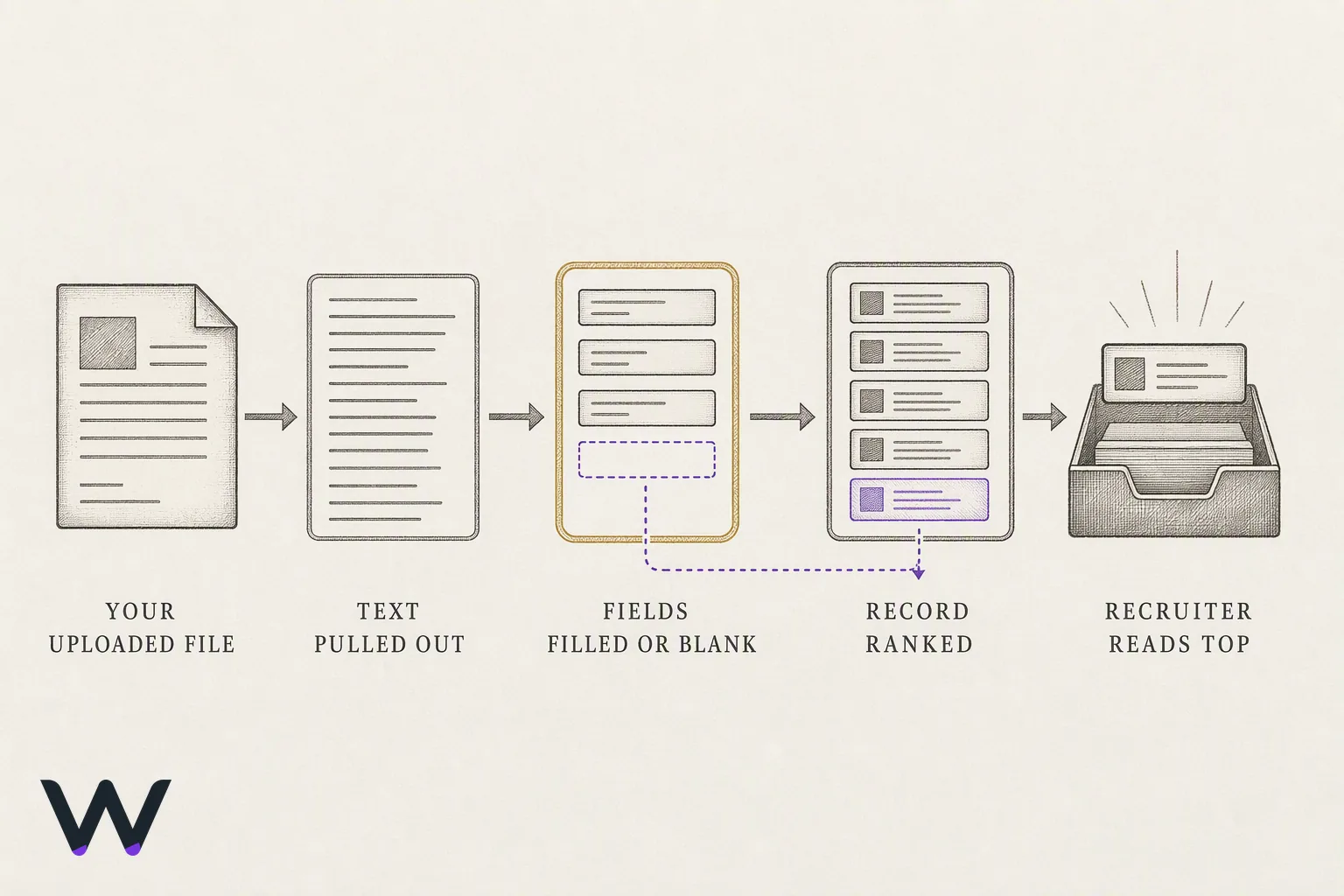
Your resume is converted before it is read. The system pulls text out of the file, maps it into fields (contact details, employment history with start and end dates, education, skills), then scores and ranks that record against the job's stated requirements using AI and natural language processing [2]. Ranking happens on the fields, not on your file. Most rejections start upstream of the ranking, in the conversion.
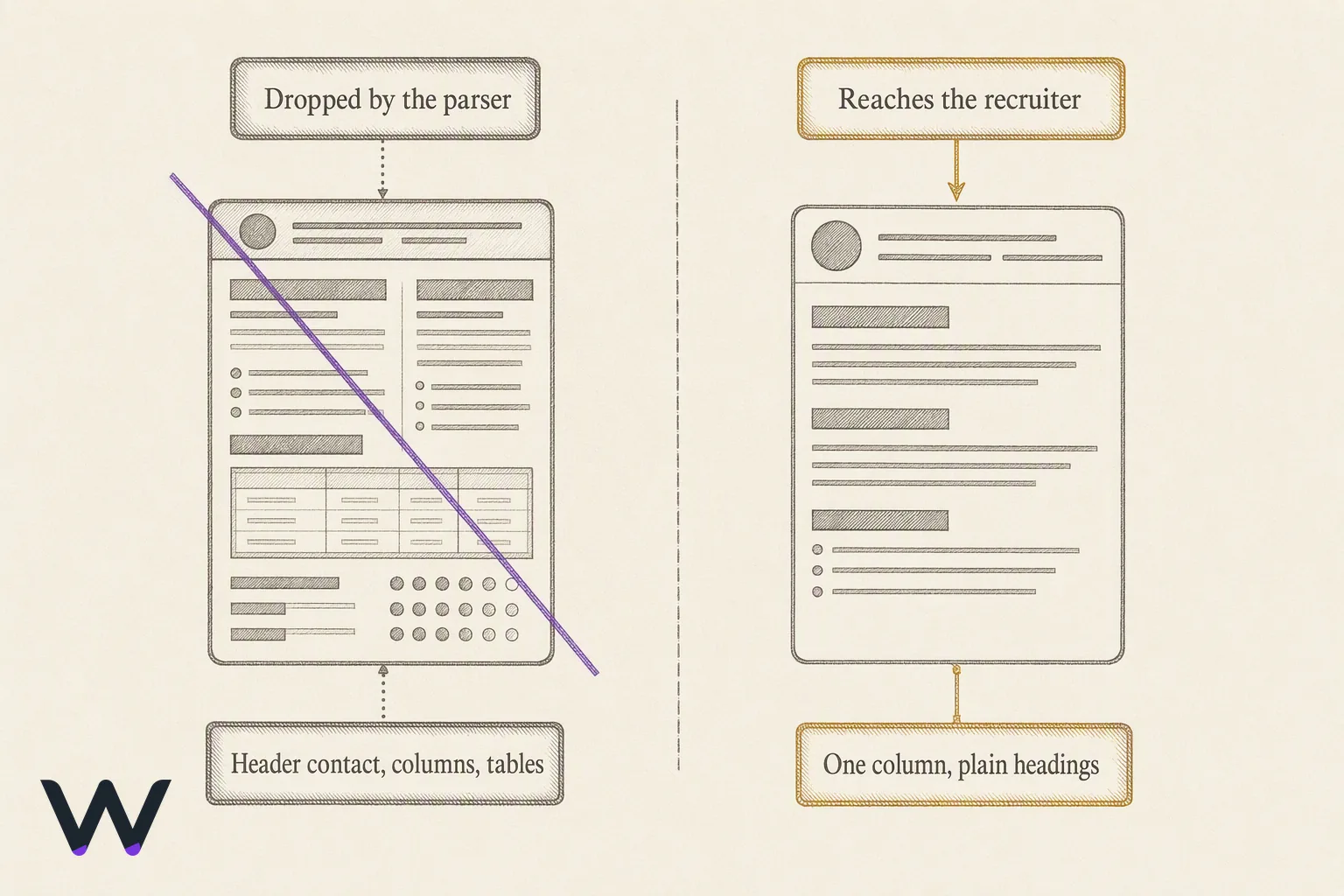
Rejection usually traces to a blank field rather than a verdict on your career. Six formatting choices cause most of the blanks:
- Tables and multi-column layouts. Parsers are often unable to read charts, tables, or images, so that content never reaches the recruiter's view [1].
- Headers and footers. Contact details parked there get skipped, which is how a record arrives with no phone number. This one is not documented by any source below. It is a pattern visible in parsed previews, so verify it on your own file rather than taking it on faith.
- Graphics, logos, and skill bars. A five-dot rating graphic carries no text, so it carries no skill — the same failure as an embedded image, which a parser cannot read [1].
- Non-standard section labels. "Where I've Been" maps to nothing. "Employment History" maps to the employment field. Observable, not sourced: upload both and compare the parsed preview.
- Undefined abbreviations. Systems can fail to recognize abbreviations, so spell out "search engine optimization (SEO)" on first use [1].
- Mixed date formats. Pick one chronology style, like "March 2024 to June 2026", and use it in every role. The parser maps employment history to start and end dates, so give it one pattern to find.
Fix those and the keyword matching stage gets something to work with. Keyword matching is comparatively dumb work: the record either contains the employer's terms in the right fields or it does not, and the ranking sorts on the answer [2]. A skill sitting inside an unreadable table scores the same as a skill you never had.
A human still picks who gets called from the top of that ranked list. Nobody at the company ever sees the design decisions you agonized over. The recruiter is looking at a row in a candidate database, your name in one column and your last title in another. Make that row correct. The document is a delivery mechanism.
Applicant tracking system: how to beat the parse without gaming it
Pass your resume through an ATS by writing for the fields and filling them with the employer's own words. Three habits do most of the work: pull the vocabulary out of the job description itself, mirror its noun phrases exactly, and keep one plain .docx master you copy and tailor per role. Ten minutes a posting.
The routine:
- Read the posting twice, marking every noun phrase that repeats. Repetition is the employer telling you what the record gets matched against — the system scores your keywords and work history against the job's stated requirements [2].
- Mirror the phrasing exactly. If the posting says "accounts payable", write "accounts payable", not "AP" and not "invoice processing". An unrecognized abbreviation costs you the match [1].
- Use standard section labels and the default font. Career advisers recommend keeping formatting as simple as possible and sticking with the default font, since a parser gains nothing from fancier stylistic choices [2].
- Quantify achievements with real numbers. Job seekers are advised to quantify achievements with concrete figures when tailoring for a specific screened posting [1].
- Open every bullet with an action verb, then the object, then the result. Same shape every time. This is a readability convention for the human reading the shortlist, not a parser requirement.
- Check the parsed preview after upload and correct whatever the system got wrong, before you submit. Not every system shows you one; where it does, it is the only direct look you get at the record being ranked.
Skip the tricks. White-text keyword blocks and stuffed skills sections do parse, which is exactly the problem: they hand a recruiter a record that reads like a word list, and the recruiter makes the decision. Beating the parse and writing for the person are the same task done in order.
Open the last five postings you applied to and highlight the noun phrases that repeat inside each one. Any of those words missing from your resume is tonight's rewrite queue.
Applicant tracking system examples: the five you will actually meet this month
Workday, Greenhouse, Oracle Taleo, iCIMS and Lever are the systems an active applicant runs into most often in a given week. That claim is not sourced to a market-share report and should not be read as one — it is a pattern from applying, and the useful part is verifiable in your own address bar rather than in any citation. You can name the system before you fill in a field, because the URL gives it away. A career site running Workday Recruiting sends you to a myworkdayjobs.com subdomain, Greenhouse posts sit on a boards.greenhouse.io path, Lever uses jobs.lever.co, and Taleo still shows taleo.net inside the link. Look once. Then decide how much time the application deserves.
The difference that matters to you is not the vendor's feature list. It is whether the form re-keys your resume into manual fields or parses it and gets out of the way. The table below describes what each application flow looks like from the applicant's side of the screen. Vendors do not publish this, and it changes when a customer reconfigures its career site, so treat it as a starting expectation rather than a specification — and check the URL before you budget your time.
| System | What the application looks like | Resume handling | Usually seen at |
|---|---|---|---|
| Workday Recruiting | Account signup, multi-page wizard, saved profile | Parses, then asks you to confirm and correct every work-history field | Large enterprises, banks, universities, healthcare |
| Oracle Taleo | Older interface, step counter, session timeouts | Parses roughly; expect to retype dates and titles | Legacy enterprise, government contractors, retail chains |
| iCIMS | Branded career site portal, moderate form length | Parses into a profile you can edit before submitting | Mid-market and enterprise, high-volume hiring |
| Greenhouse | Single short page, drag-and-drop upload | Parses silently, no manual re-entry | Tech companies, startups, scale-ups |
| Lever | Single short page, optional profile links | Parses silently, pulls LinkedIn and GitHub URLs | Startups and mid-size tech |
Workday and Taleo are where applicants quit halfway. Budget twenty minutes for those, and use a saved profile so the second application at the same employer costs you five.
At the small end, an applicant tracking system free tier is doing the work: Zoho Recruit, Freshteam-class tools and the recruiting module bundled into an HR suite. Those handle career site management and job posting for employers hiring a handful of people a year. The form is short, the parsing is basic, and a human opens nearly everything that arrives. A plain .docx goes further there than any formatting trick.
Read the candidate experience: what the portal status and interview scheduling emails actually mean
Portal status labels are set by a recruiter clicking a dropdown, not by the software judging you. "Under review" means someone moved your record into a stage. "In progress" often means nothing moved at all. No vendor documents any of that — it is what the labels turn out to mean in practice, and the reason they are worth so little as a signal. The only status worth acting on is the one that produces an email, and the highest-value email is a self-serve interview scheduling link. That link exists because a coordinator opened a calendar block for you specifically.
Silence is the default, not a verdict. 48% [4] of entry-level job seekers cite not hearing back after applying as their single biggest frustration with the hiring process. That frustration is real, and it is also a poor signal, because most systems only send automated rejections when the employer configures them to.
Here is the follow-up rule that holds up. Follow up once, by email, to the named recruiter, ten business days after applying, and only for roles you would take today. Ten days is a convention rather than a measured threshold — no source below sets a number, so treat it as a floor that keeps one polite note from becoming three. If the job posting disappears from the career site, or your portal status flips to "closed" or "filled," the requisition is done and no follow-up reopens it. Move on that day.
Watch for one more signal: a posting that stays live for months with no recruiter outreach to anyone. That is a pipeline requisition, collecting resumes against a role that may open later. Apply if it costs you ten minutes. Do not wait on it.
✨ Build a Resume That Gets Interviews
AI analyzes 24 ATS criteria · Tailors your resume to each job · Free forever
Build My Resume Free →★ 4.7/5 on Reviews.io
Where applicants lose: keyword stuffing, white text, and chasing a match score
Four tactics reliably cost applicants more than they return, and all four survive because they sound clever. Invisible keyword blocks are the worst — white text on white background, or a keyword list set to one-point type. Parsers read the text layer, so the words land in the record exactly as intended [2]. But a recruiter opening the file sees a candidate who tried to trick them, and that is a rejection no score can undo.
Stuffed skills sections fail more quietly. A forty-item skills list with no dates or context parses fine and ranks poorly, because the score runs against work history as well as keywords, and a bare list gives a recruiter nothing to anchor recency to [2]. Blasting one untailored resume at every posting fails for the same reason, one step earlier: the record is scored against each job's stated requirements, and one set of words cannot match every posting [2]. And applying twice to the same requisition creates duplicate records a recruiter has to merge — the first impression you did not want. That last one is portal-side experience rather than documented behavior.
Is 80% a good ATS score? An 80% match on a third-party checker tells you your wording overlaps the job description well. It tells you nothing about the employer's ranking, which runs on their filters, their required fields and their recruiter's own search — the checker's number is a proxy for phrasing overlap, no more [3]. Treat it that way and stop optimizing past "good enough."
Can an ATS hurt my chances of getting hired? Yes, and not through malice. Keyword-based automated screening filters out more than half of genuinely qualified candidates before a human reads anything [3]. Vocabulary mismatch does that, not a skill gap. Fix the vocabulary; ignore the score.
Frequently asked questions
How do I pass my resume through ATS?
Pass an ATS by writing plainly and using the employer's own nouns. Keep one .docx master with standard headings, one column, no text boxes, and dates in a consistent format — formatting should stay as simple as possible, default font included [2]. Copy the job description's exact skill phrases into your bullets where they are true, and spell out abbreviations, which parsers can fail to recognize [1]. Ten minutes of tailoring per posting beats any formatting trick.
Is 80% a good ATS score?
An 80% score on a resume checker means your wording overlaps the job description closely. It does not mean the employer ranks you at 80%. A keyword-matching score can flag over half of genuinely qualified candidates as non-matches purely from wording differences rather than skill gaps, which makes it a proxy for phrasing overlap and nothing more [3]. Use the score to catch missing vocabulary, then stop.
Why is my resume getting rejected by ATS?
Most rejections come from three places: a knockout question answered wrong, a title or skill the employer searched for that appears nowhere in your file, or a layout that parsed into scrambled fields. The third is the documented one — parsers are often unable to read charts, tables, or images, so multi-column layouts and graphics drop out of the record entirely [1]. The knockout-question and header-bar failures are portal-side patterns rather than published findings. Check your parsed profile before you submit.
Can an ATS hurt my chances of getting hired?
Yes, when your vocabulary and the job description's vocabulary do not overlap. The system filters on words, and keyword-based screening carries algorithmic friction above 50%, so a qualified candidate using different phrasing gets sorted out silently [3]. Rewriting bullets in the posting's language fixes most of it.
Tonight, re-save one master resume as a single-column .docx with plain headings. Use that file for every application this week.
References
- Understanding Applicant Tracking Systems (ATS) Software Before Submitting a Resume — csulb.edu
- Applicant tracking system: The secret to beating a resume-filtering ATS — cio.com
- Quantifying Algorithmic Friction in Automated Resume Screening Systems — arxiv.org
- AI Is Reshaping Early Career Hiring Expectations, New ICIMS Data Reveals — icims.com

Build a Resume That Gets Interviews
- ✓AI scores your resume on 24 ATS criteria
- ✓Tailors it to each job with one click
- ✓Unlimited resumes — free forever