
For a typical U.S. online application, a cover-letter header with your name, city and state, phone number, and email is a practical default; a full home street address is not a universal requirement. Follow the employer's instructions, and use a conventional mailing-address block when the application calls for a formal printed letter or a particular template.
Wobo's cover-letter builder helps you turn the right address format into a finished application letter. You can manually edit your contact details and letter, preview the layout, and export a PDF on every plan. The free plan also includes an allowance for AI-generated drafts that you can review and edit before sending.
There are two separate questions: how much of your own address to include and whether to include the employer's address. The right layout depends on how you are sending the letter.
Reviewed October 28, 2026. Guidance focuses on U.S. job applications. The layouts below are original illustrative examples, not mandatory formatting rules.
Choose the address format for the application
Wobo's suggested approach is to start with the submission instructions, then choose a layout that makes you easy to contact without adding unnecessary information.
| How you are applying | Your contact information | Employer information |
|---|---|---|
| A letter pasted into an email | Name, phone, and email in the signature; location if relevant | Use the appropriate greeting; postal blocks are generally unnecessary in the message body |
| A document uploaded to an online application | Match your resume's contact header; city and state can provide location context | Company and hiring contact or team; add a mailing address when known and useful or requested |
| A printed letter or a required formal template | Use the sender-address format requested by the recipient | Use a verified mailing address and the named recipient or department |
| A required address field in the application form | Answer that field accurately according to the form's instructions | This is separate from how much address appears on your cover letter |
Career centers do not all prescribe the same layout. UConn allows a letter header that mirrors the resume's contact section and marks the employer's street address “if known.” Boston College's traditional example includes both sender and employer mailing addresses. There is no new calendar-year rule that overrides an employer's instructions.
What should go in your contact header?
- Your name: use the same professional name as on your resume and application.
- Email: use an address you monitor and check it for typos.
- Phone: include a number where you can reliably receive calls or messages.
- Location: city and state usually provide useful context for U.S. roles; include your country when applying internationally.
- Portfolio or professional link: include it when it adds relevant evidence and the URL works.
A home street address is more detailed than a recruiter usually needs just to contact you electronically. For a standard online letter, our recommendation is to leave it out unless the instructions or context call for it. Keep your contact details useful and concise, with city and region when relevant to the application.
Keep the header consistent with the resume. UC Berkeley recommends matching the two documents' header and visual style. Do not turn the contact area into a large design element that pushes useful evidence off the page.
Example 1: an online application with no street address
This illustrative layout is suitable when no special address format is requested. Replace the example contact details and write the body for the specific role.
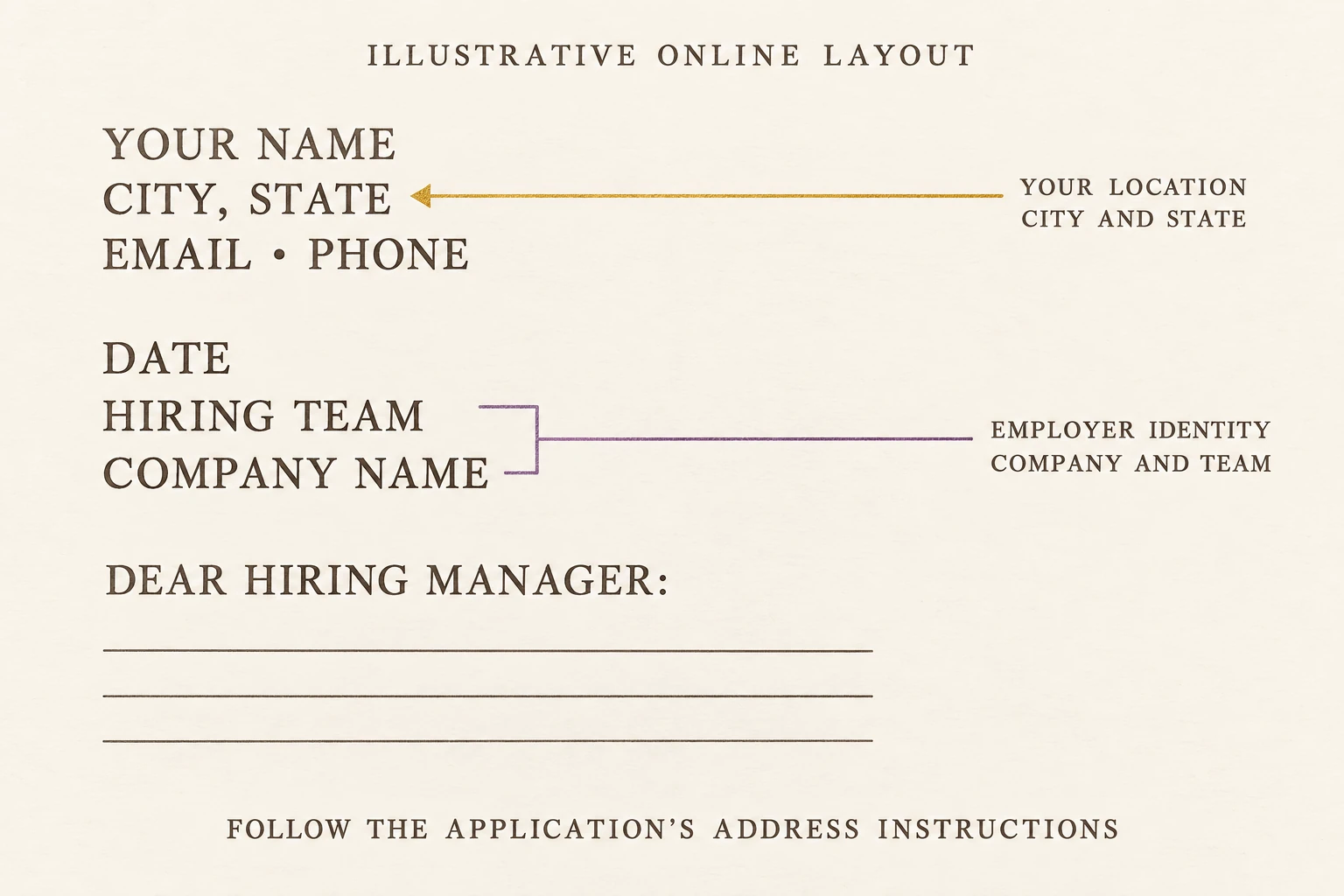
Illustrative online layout: city and state identify your location, while the company and hiring team identify the recipient. Follow any request for a home or employer street address; required application-form fields are separate.
Jordan Lee
Denver, CO · jordan.lee@example.com · 303-555-0146October 28, 2026
Hiring Team
[Company name]Dear Hiring Manager:
I am applying for the [Job title] position. My experience in [relevant work] would help your team [specific need from the job description].
[Explain a relevant example from your experience and connect it to the role.]
Thank you for considering my application. I would welcome the opportunity to discuss how I could contribute.
Sincerely,
Jordan Lee
Notice that the applicant's location and the employer's identity are present even though neither street address appears. If the employer provides a contact name, use that verified name in the recipient block and greeting.
Example 2: a traditional printed letter
For a letter being mailed, use a verified delivery address. Follow any required organizational template rather than substituting an online-only header.
[Your street address]
[City, State ZIP]
[Email and phone][Date]
[Recipient's name]
[Recipient's role]
[Company name]
[Company mailing address]
[City, State ZIP]Dear [Recipient's full name]:
[Your tailored cover-letter body]
Sincerely,
[Signature, when appropriate]
[Your typed name]
Use the address associated with the hiring office or stated application process. A company's headquarters, retail location, and mailing address are not necessarily interchangeable. Do not invent a street address to make the template look complete.
Example 3: a cover letter written in an email
When the employer requests an email application, put the role and any required reference number in the subject. This illustrative email uses a signature instead of mailing blocks:
Subject: [Job title] application — Jordan Lee — [Reference number]
Dear [Hiring contact or Hiring Manager]:
I am applying for [Job title] at [Company]. In my work on [relevant responsibility], I developed experience in [skill] that relates to your need for [specific requirement].
[Add a concise example and the reason you are interested in this role.]
I have attached the requested documents. Thank you for considering my application.
Best regards,
Jordan Lee
Denver, CO
303-555-0146
jordan.lee@example.com
Check that the attachments are actually present. If the employer requests a separate cover-letter attachment, do not assume that pasting the letter into an email is an acceptable substitute.
What if you do not know the employer's address or hiring manager?
Check the job advertisement and the company's official careers or contact page. If an online application does not request a postal address and you cannot identify the relevant office, use the company and team name rather than guessing.
If you cannot verify the person's name, Dear Hiring Manager: or an accurate team greeting is a practical choice. For more options, see how to start a cover letter without a name. Our “To Whom It May Concern” format guide explains when a general greeting is useful and when a more specific one fits better.
Remote work, relocation, and international applications
Remote positions
Do not replace your real location with “Remote.” The employer may still need to know where you are based. Use your current city, state, or country, then address relevant availability or location requirements accurately in the application. A remote role is not necessarily open to applicants everywhere.
Relocating for a job
List your current location. If true, add a clear note such as “Denver, CO — relocating to Chicago, IL in January 2027” or “Open to relocation to Chicago.” Those statements mean different things: one describes a definite plan; the other describes willingness. Do not list a city as your current home if you do not live there.
International roles
Include the country and an appropriate international phone prefix. Check the employer's local application guidance; the U.S. layouts above are not a universal standard. Address formatting does not establish work authorization, so answer any separate eligibility questions directly and accurately.
A final address and privacy check
- The company name and any recipient name match the actual posting.
- Your location is accurate and consistent with your application.
- Your phone and email work and are easy to read.
- You have followed required form fields separately from the document layout.
- You have removed sample names, phone numbers, and brackets.
- The file opens correctly after export, and contact details are not clipped.
Keep enough room for evidence of your fit. Our cover-letter length guide can help you decide what to cut.
Create your cover letter in Wobo, adjust the contact block to the employer's instructions, and preview the document to check that names, location, and contact details are complete and readable. Export the finished PDF when you are ready to apply.
Frequently asked questions
Does a cover letter need my full home address?
Not for every application. For a typical U.S. online application, a contact header with your city and state is a practical choice. Include a full address when the employer's instructions or the required format call for it.
Do I need the company's street address?
Use a verified mailing address for a mailed letter or when requested. For an online application, do not invent an address if the relevant office is unknown; identify the company and hiring team instead.
Can I omit all location information for a remote job?
Giving your actual city, state, or country is useful because remote roles can have location restrictions. Follow any separate location and eligibility questions in the application.
Is a postal code required in an email cover letter?
A postal code is usually unnecessary in an email signature unless requested. A required address field in an application form is a separate matter.
Should the cover-letter and resume headers match?
Using the same contact information and visual style makes the documents easier to recognize as one application. Adjust the letter if the employer requires a different format.

Build your next application with Wobo.
- ✓Free AI resume builder with unlimited PDF downloads
- ✓Resume, cover-letter and application tools in one workspace
- ✓Choose jobs yourself or automate with paid Autopilot

![Zety Review 2026: We Tested It [+ Best Alternatives]](/assets/blog-covers/zety-review.webp)
![Teal Review 2026: We Tested It [+ Best Alternatives]](/assets/blog-covers/teal-review.webp)